Supplement Facts vs Nutrition Facts: Which One Does Your Product Need?
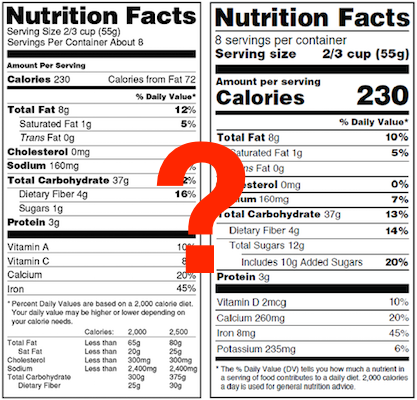
If you're launching a food, beverage, or dietary supplement, one of the first labeling decisions you'll need to make is whether your product requires a Supplement Facts panel or a Nutrition Facts label. In most cases this answer will be obvious, but some functional foods can blur the line.
In this guide, we'll explain the differences between Supplement Facts vs Nutrition Facts, how to determine which panel your product needs, and the key formatting requirements you should know. If you've already determined that your product requires a Supplement Facts panel, you can create one in minutes with ReciPal.
What Is a Supplement Facts Panel?
A Supplement Facts panel is used for products marketed as dietary supplements. These products are intended to supplement the diet rather than serve as conventional foods or beverages.
Dietary supplements may contain:
- Vitamins
- Minerals
- Herbs and botanicals
- Amino acids
- Concentrates, extracts, metabolites, and other dietary ingredients
Common examples include multivitamins, fish oil capsules, creatine powder, electrolyte tablets, and herbal supplements.
How to Identify a Supplement
One of the easiest ways to identify a supplement is by its serving.
If the serving size is a capsule, tablet, gummy, or other measured dose, the product will often require a Supplement Facts panel.

What Is a Nutrition Facts Label?
A Nutrition Facts label is required for conventional foods and beverages intended to provide nourishment.
Examples include:
- Granola bars
- Yogurt
- Snack foods
- Juices
- Frozen meals
Even if these products contain added vitamins, protein, or other functional ingredients, they're still considered food products since they function as part of a meal.

Nutrition Label vs Supplement Label: Quick Comparison
Both labels communicate nutritional information, but they're designed for different product categories.
| Feature | Supplement Facts | Nutrition Facts |
|---|---|---|
| Used for | Dietary supplements | Conventional foods |
| Primary purpose | Increase specific nutrient intake | Provide nourishment as part of a meal |
| Typical serving | Capsule, tablet, gummy, scoop | Cup, bottle, piece, ounce |
| Proprietary blends | ✓ Allowed | ✗ Not allowed |
| Ingredients without Daily Values | ✓ Allowed | ✗ Not allowed |
| Structure/function claims | ✓ Allowed (with disclaimer) | Different rules |
Which One Does Your Product Need?
This is the question many manufacturers are trying to answer for products that blur the line
Fortunately, the FDA's approach is relatively straightforward.
The most important factor isn't necessarily what's inside the product—it's how the product is intended to be used and marketed.
Choose a Supplement Facts Panel if...
Your product is intended to supplement the diet.
Examples include:
- Daily vitamins
- Creatine
- Fish oil
- Magnesium
- Herbal supplements
- Collagen supplements
These products are generally taken as a measured dose rather than eaten as food.

Choose a Nutrition Facts Label if...
Your product is intended to be eaten or consumed as food.
Examples include:
- Protein bars
- Breakfast cereals
- Cookies
- Smoothies
- Snack foods
Even products with high protein or added nutrients often fall into this category.
Products That Could Go Either Way
Some products like protein powders can qualify for either panel.
A protein powder marketed as a sports supplement may use a Supplement Facts panel.The exact same formulation marketed as a meal replacement or conventional food would typically require a Nutrition Facts label. How you position your product matters.

Supplement Facts vs Nutrition Facts: Key Differences
While the two labels share a similar appearance, there are several important differences.
Dietary Ingredients
Supplement Facts panels separate dietary ingredients into categories that don't exist on Nutrition Facts labels.
Ingredients without established Daily Values are allowed to be listed after ingredients that have have Daily Values (see Omega-3 fatty acids in the image below).

Proprietary Blends
Supplement Facts panels allow manufacturers to declare proprietary blends by listing the total blend weight followed by ingredients in descending order.
Nutrition Facts labels do not allow proprietary blends.

Ingredient Statements
Inactive ingredients—such as fillers, binders, and capsules—must still appear in the ingredient statement outside the Supplement Facts panel.
Claims
Dietary supplements may make structure/function claims but generally require the familiar FDA disclaimer:
"These statements have not been evaluated by the Food and Drug Administration. This product is not intended to diagnose, treat, cure, or prevent any disease."
Nutrition Facts labels follow different claim requirements.
Supplement Facts Font and Formatting Requirements
A common question is whether the FDA requires a specific Supplement Facts font.
The answer is no, but the FDA does require specific formatting rules.
These include:
- Minimum font sizes
- Bold headings
- Line thickness
- Nutrient order
- Box dimensions
- Required spacing
- Footnotes
Because these formatting requirements are detailed, many manufacturers use software, like ReciPal, that automatically generates compliant labels rather than building them manually. If you're weighing your choices, our roundup of the best supplement label makers compares the main options.
Create FDA-Compliant Supplement Facts Labels
Once you've determined that your product requires a Supplement Facts panel, creating the label doesn't have to be complicated.
ReciPal automatically formats your label according to FDA requirements, calculates nutrient values, supports proprietary blends, and lets you customize your finished label for packaging—saving hours of manual formatting while helping you stay compliant.
Create your Supplement Facts label with ReciPal. Your first label is free.
Frequently Asked Questions
Can protein powder use either label?
Yes. Depending on how it's marketed, protein powder may qualify for either a Supplement Facts panel or a Nutrition Facts label.
Are both labels regulated by the FDA?
Yes. Both are regulated by the FDA but follow different labeling requirements.
Do supplements have to follow font requirements?
Yes. While the FDA doesn't mandate a specific typeface, it does specify minimum font sizes, spacing, line weights, and overall panel formatting.